Udemy
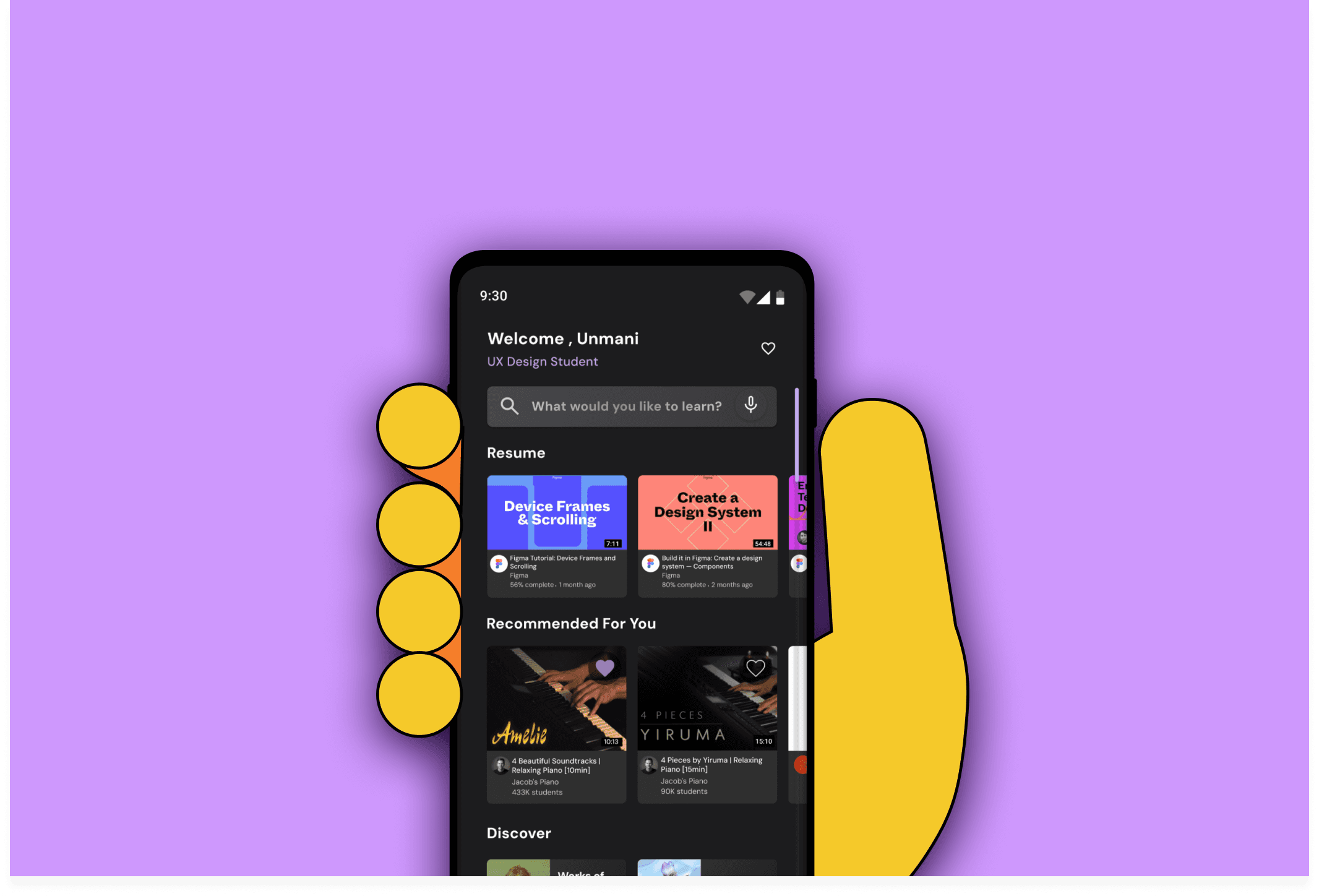
Understanding and applying cognitive ergonomics to redesign the Udemy app.
Team
3 People
Type
Classroom Project
Duration
2 Weeks
My Role
Understanding the impact of each test! Working alongside my teammates in conducting an extensive review of the app I learnt how to make sense of the numbers and take this data to drive the design decisions I made in redesigning Udemy's mobile app.
Evaluating How people react
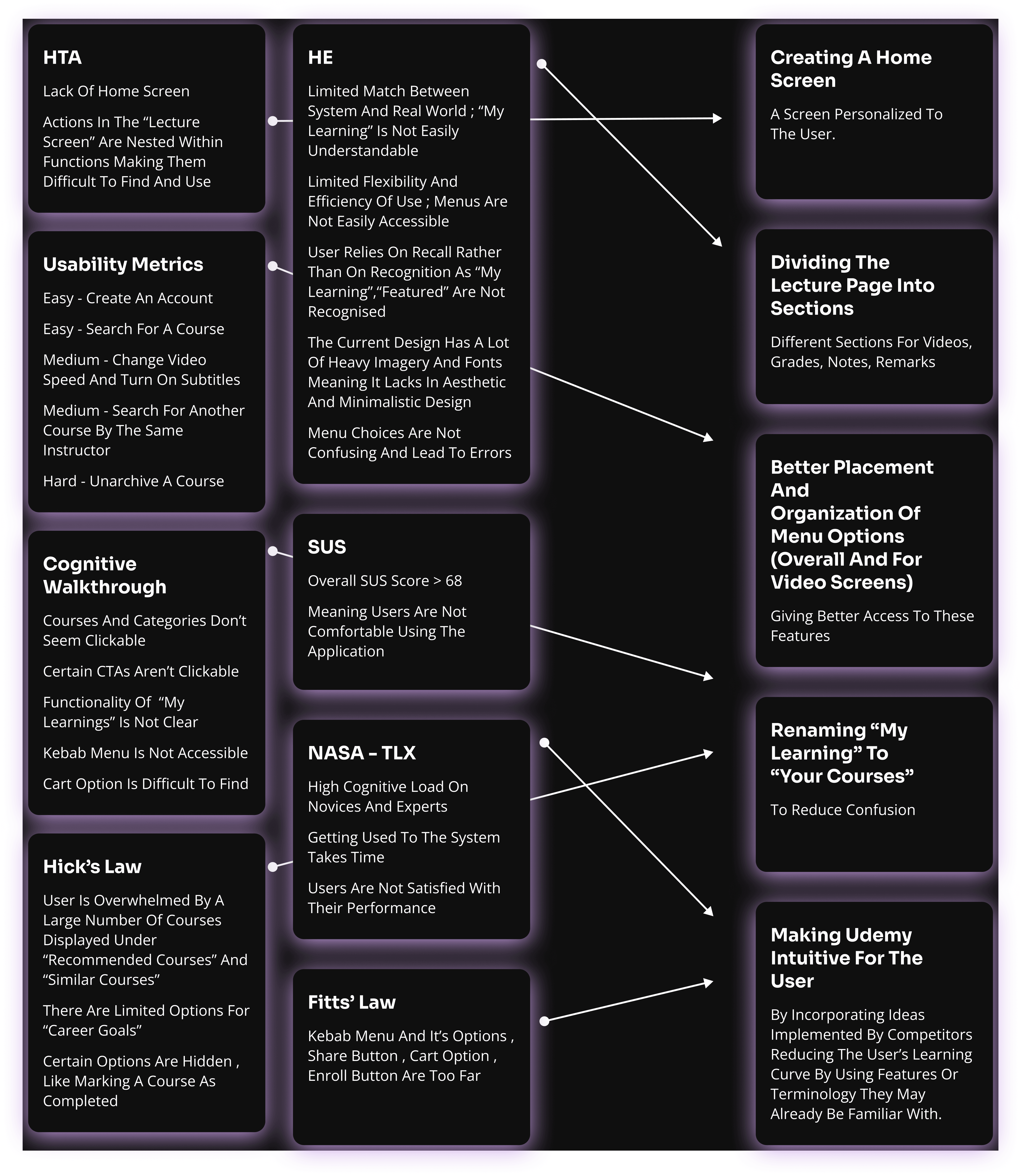
Cognitive Ergonomics at it's core is about understanding what works and doesn't work for people. It is about recording and understanding their reactions (and opinions!) . In doing this evaluation , the methods we focused on were: Hierarchal Test Analysis (HTA), Usability Metrics, Cognitive Walkthrough, System Usability Scale (SUS), NASA-TLX, Hick's Law and Fitts' Law.
Udemy is well-known , but how is it perceived?
Udemy, a prominent online education platform, delivers a broad array of courses within the flourishing e-learning sector. Boasting benefits such as an extensive course catalog and affordability, Udemy vies with rivals like Coursera and Skillshare. However, challenges emerge due to limited quality assurance and course discoverability, even though the platform boasts an impressive global user base surpassing 150 million. Examining Udemy from a cognitive ergonomics perspective serves as an efficient approach to grasp how its users perceive and react to the experience it provides while evaluating its objective of offering accessible and affordable education to anyone with internet access.
So basically , our to-do list looked like
Undertake A Detailed Analysis
Gathering Insights
Identifying Areas To Improve
Implementing Suggestions Through Redesigning The UI
Suggesting Improvements
Cognitive ergonomics based assessment of the user experience provided a crucial systematic approach in understanding users' mental processes, leading to informed design decisions and ultimately improving app performance and user satisfaction.
closer Look at a few methods
The major identified areas and features for improvement led to the opportunity for redesigning the interface:
focusing on creating a functional home screen
an organized lecture screen
improved menus across the app along with improved naming conventions for making Udemy more intuitive for the user , leading to enhanced user engagement.
And The redesign focuses on
The major identified areas and features for improvement led to the opportunity for redesigning the interface:
focusing on creating a functional home screen
an organized lecture screen
improved menus across the app along with improved naming conventions for making Udemy more intuitive for the user , leading to enhanced user engagement.
The New
A deeper understanding of user behavior and cognition, guided this app redesign for an intuitive interface that boosts user engagement and satisfaction.
A dynamic splash screen reinforces brand identity, while the home screen provides easy access to personalized features.
Enhancing course visibility and searchability for improved accessibility.
The Before And The After
A deeper dive into the UI Redesign.

Home Screen
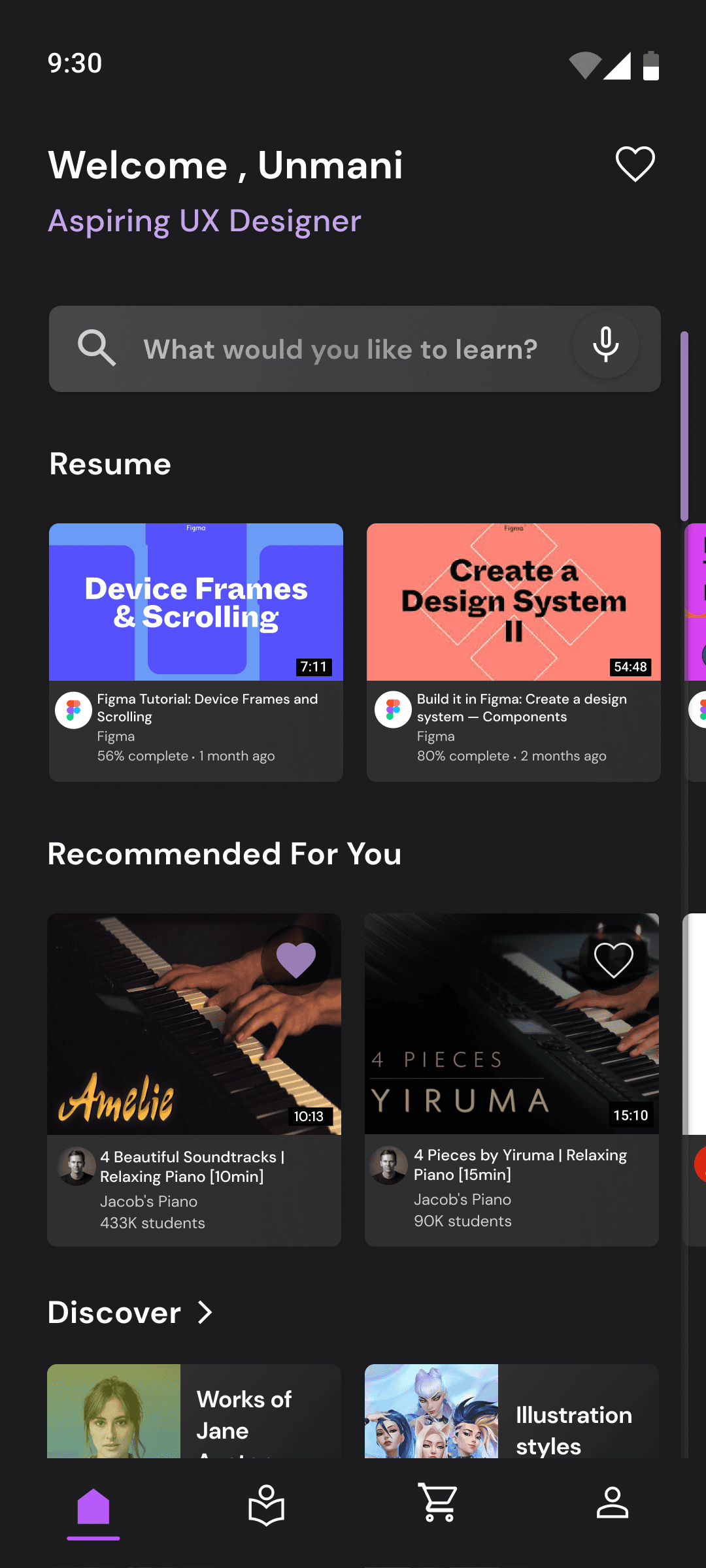
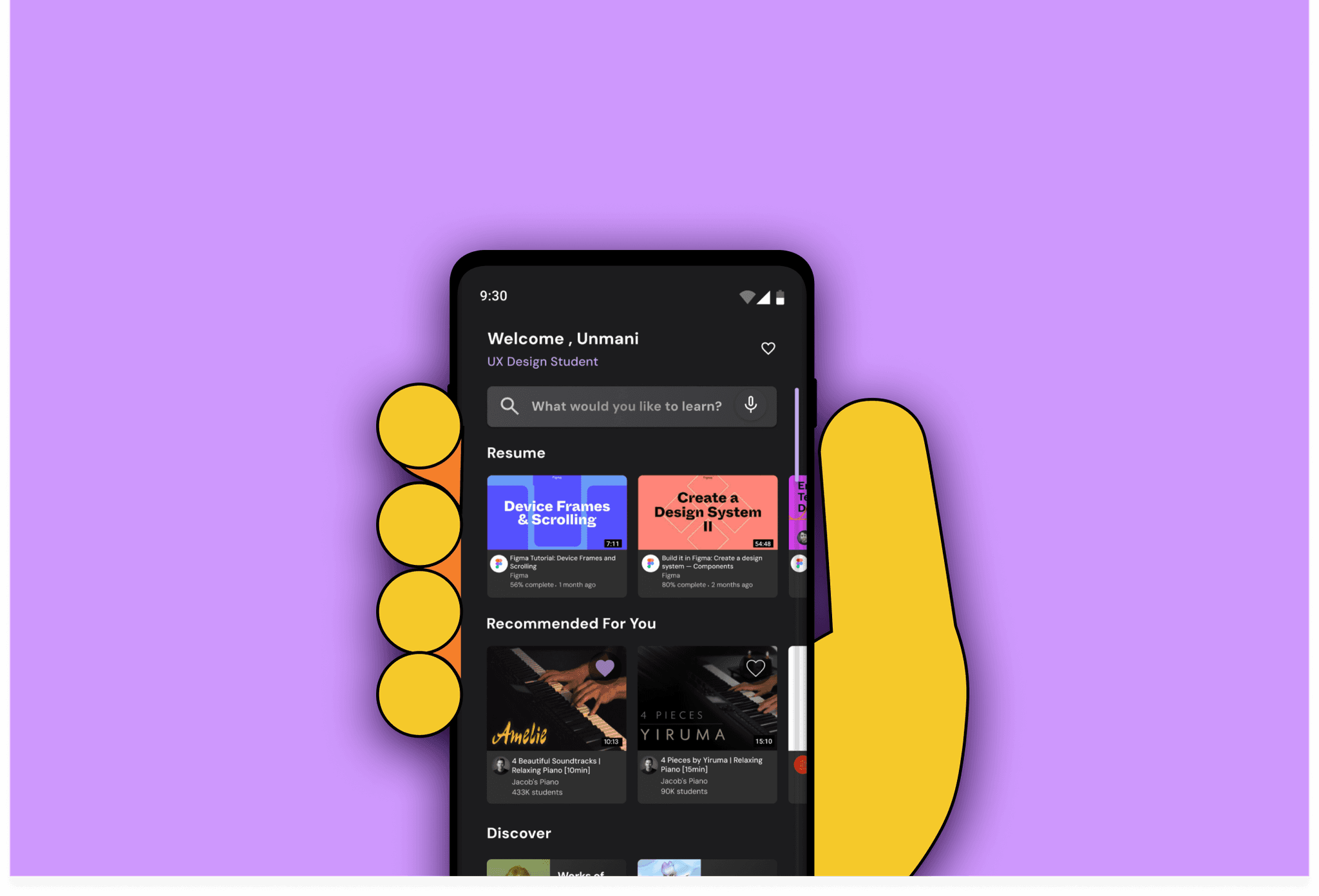
In the original design, a significant portion of screen space was dedicated to showcasing deals, which, while informative about new opportunities, obscured courses in progress for returning users, requiring additional scrolling. This introduced an unnecessary barrier between users and their ongoing courses, potentially delaying the gratification of completion and the genuine value derived from Udemy. Addressing this concern, the redesign prioritizes course resumption for returning users, followed by personalized recommendations based on onboarding data or search history for new users, as well as past completed courses. The discovery section highlights new course offerings, with recommendations and discovery serving as subtle advertisements, recognizing that information about deals can be more effectively communicated through alternative channels like social media.
Search Screen
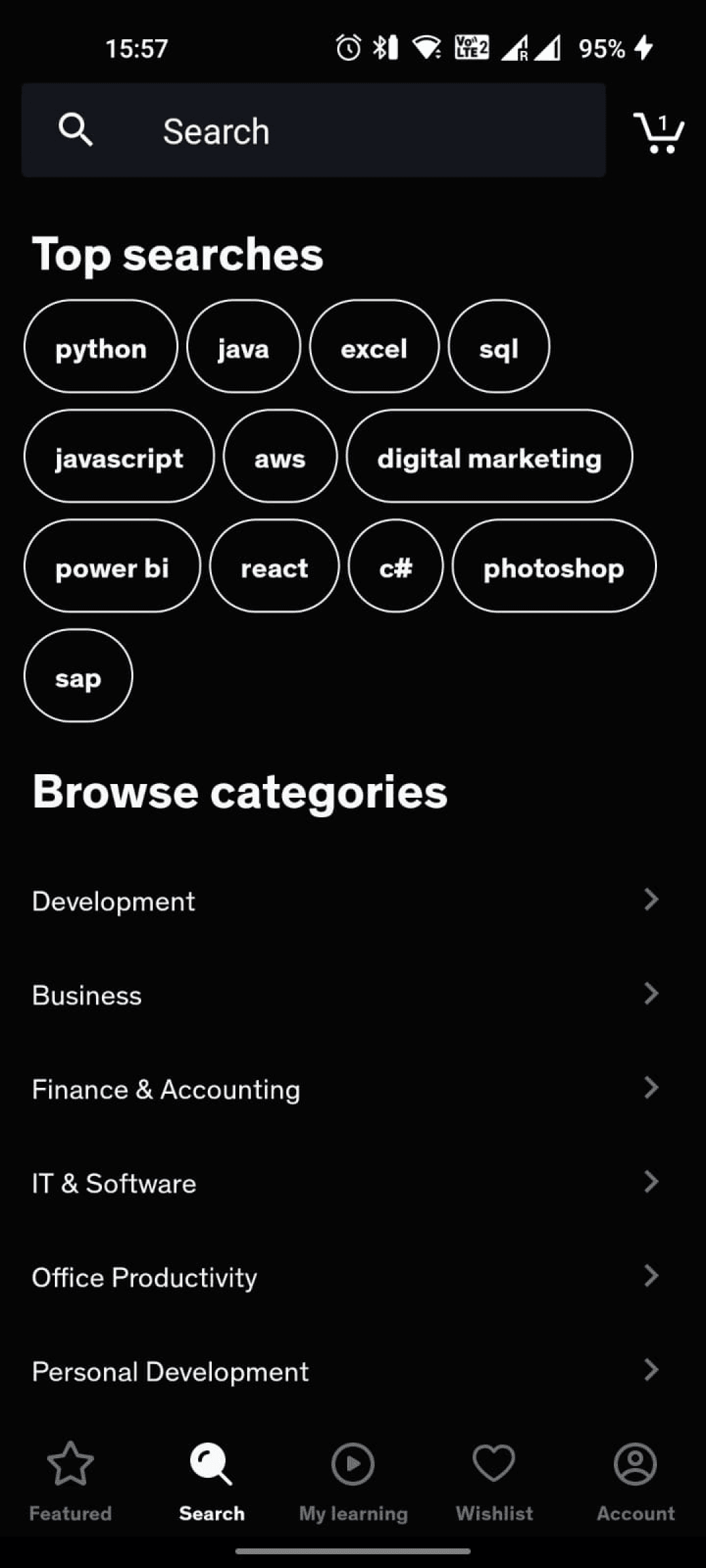
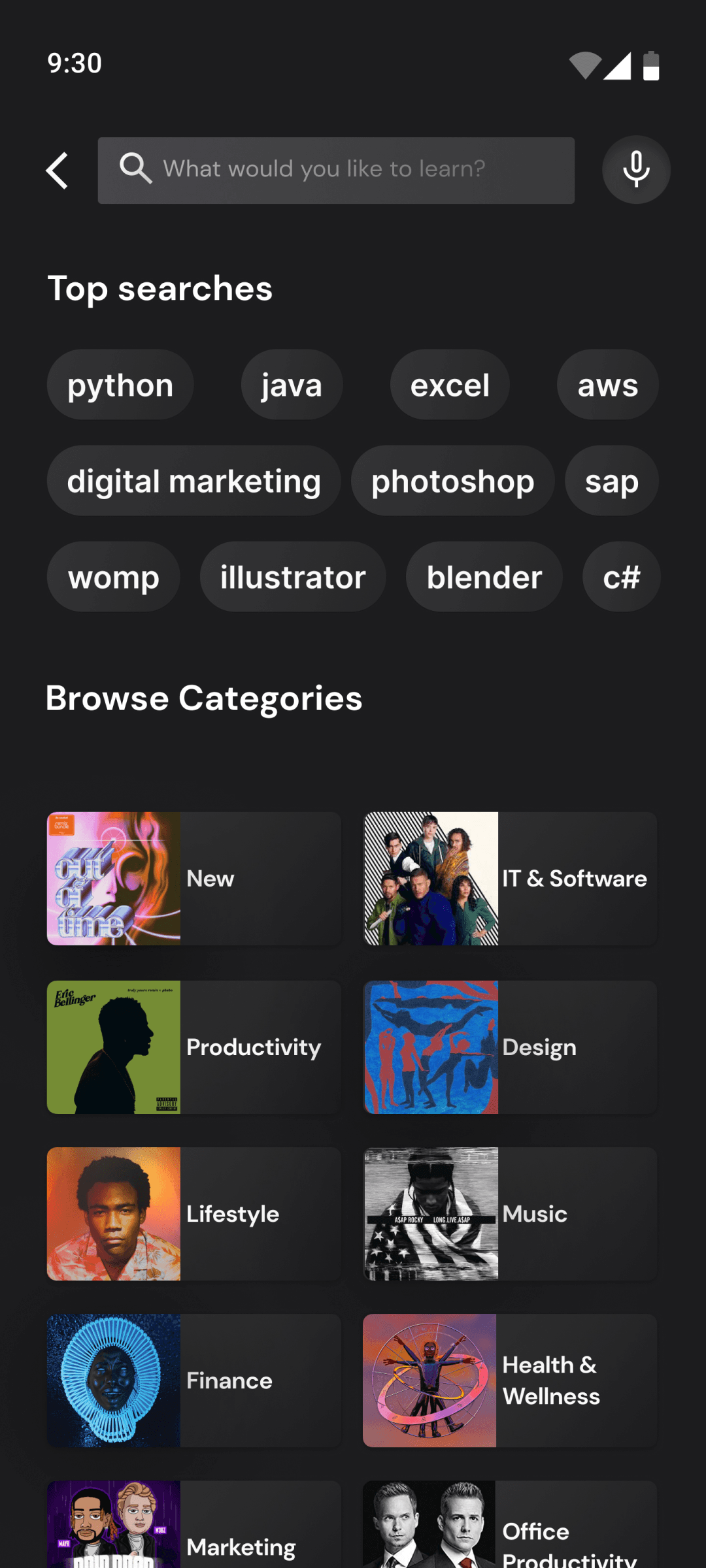
The chip component has been refreshed to align with the latest design system, ensuring seamless integration and visual coherence. Incorporating imagery within the categories section not only accentuates their presence but also infuses a sense of delight for users, enhancing the overall browsing experience.


Lessons Screen
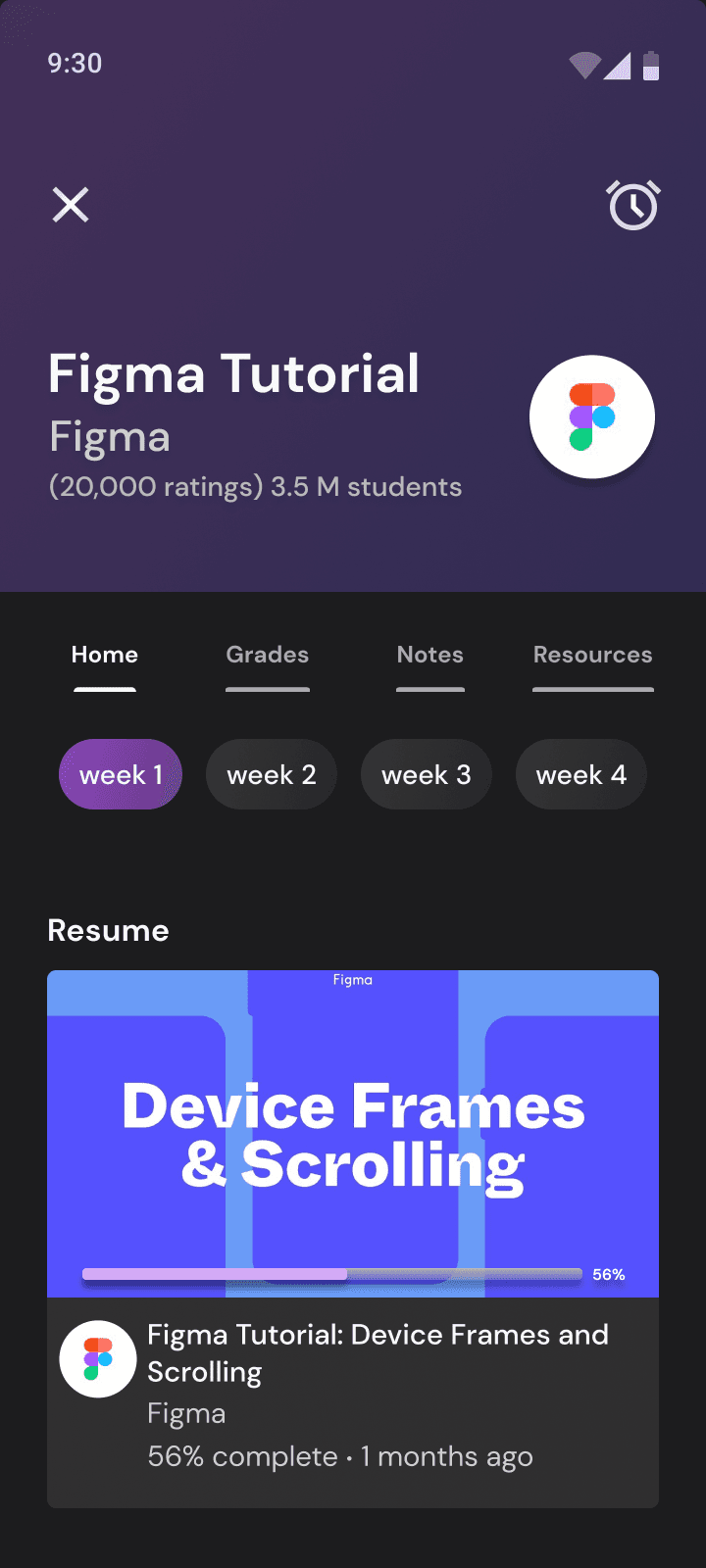
The course content is structured week by week, complemented by features such as Grades, Notes, and Resources arranged as distinct tabs. Furthermore, returning users have the convenient option of resuming their tasks seamlessly, with incomplete or upcoming tasks prioritized at the forefront, aiming to alleviate cognitive strain and streamline the course completion journey.


Courses Screen
The presence of a dedicated in-page search bar, coupled with user-friendly filter chips, amplifies the prominence of search functionality, enhancing ease of navigation and discovery. Additionally, this strategic implementation boosts the visibility of courses pertaining to specific topics, enriching the user experience with enhanced accessibility.
Project Takeaways
In this case study, I discovered the significance of understanding how users think and process information to solve their problems effectively. I also recognized the importance of gathering feedback from users to improve our work. Observing user reactions to certain updates provided valuable insights into Udemy's design decisions. While the redesign successfully reduces cognitive load and adds delight, it prompted me to reflect on the business decisions behind the original design, sparking further consideration.
Udemy
Understanding and applying cognitive ergonomics to redesign the Udemy app.
Evaluating How people react
Cognitive Ergonomics at it's core is about understanding what works and doesn't work for people. It is about recording and understanding their reactions (and opinions!) . In doing this evaluation , the methods we focused on were: Hierarchal Test Analysis (HTA), Usability Metrics, Cognitive Walkthrough, System Usability Scale (SUS), NASA-TLX, Hick's Law and Fitts' Law.
Udemy is well-known , but how is it perceived?
Udemy, a prominent online education platform, delivers a broad array of courses within the flourishing e-learning sector. Boasting benefits such as an extensive course catalog and affordability, Udemy vies with rivals like Coursera and Skillshare. However, challenges emerge due to limited quality assurance and course discoverability, even though the platform boasts an impressive global user base surpassing 150 million. Examining Udemy from a cognitive ergonomics perspective serves as an efficient approach to grasp how its users perceive and react to the experience it provides while evaluating its objective of offering accessible and affordable education to anyone with internet access.
Suggesting Improvements
Cognitive ergonomics based assessment of the user experience provided a crucial systematic approach in understanding users' mental processes, leading to informed design decisions and ultimately improving app performance and user satisfaction.
So basically , our to-do list looked like
Undertake A Detailed Analysis
Gathering Insights
Identifying Areas To Improve
Implementing Suggestions Through Redesigning The UI
closer Look at a few methods
The major identified areas and features for improvement led to the opportunity for redesigning the interface:
focusing on creating a functional home screen
an organized lecture screen
improved menus across the app along with improved naming conventions for making Udemy more intuitive for the user , leading to enhanced user engagement.
And The redesign focuses on
The major identified areas and features for improvement led to the opportunity for redesigning the interface:
focusing on creating a functional home screen
an organized lecture screen
improved menus across the app along with improved naming conventions for making Udemy more intuitive for the user , leading to enhanced user engagement.
The New
A deeper understanding of user behavior and cognition, guided this app redesign for an intuitive interface that boosts user engagement and satisfaction.
A dynamic splash screen reinforces brand identity, while the home screen provides easy access to personalized features.
Enhancing course visibility and searchability for improved accessibility.
The Before And The After
A deeper dive into the UI Redesign.
Home Screen
In the original design, a significant portion of screen space was dedicated to showcasing deals, which, while informative about new opportunities, obscured courses in progress for returning users, requiring additional scrolling. This introduced an unnecessary barrier between users and their ongoing courses, potentially delaying the gratification of completion and the genuine value derived from Udemy. Addressing this concern, the redesign prioritizes course resumption for returning users, followed by personalized recommendations based on onboarding data or search history for new users, as well as past completed courses. The discovery section highlights new course offerings, with recommendations and discovery serving as subtle advertisements, recognizing that information about deals can be more effectively communicated through alternative channels like social media.
Search Screen
The chip component has been refreshed to align with the latest design system, ensuring seamless integration and visual coherence. Incorporating imagery within the categories section not only accentuates their presence but also infuses a sense of delight for users, enhancing the overall browsing experience.
Lessons Screen
The course content is structured week by week, complemented by features such as Grades, Notes, and Resources arranged as distinct tabs. Furthermore, returning users have the convenient option of resuming their tasks seamlessly, with incomplete or upcoming tasks prioritized at the forefront, aiming to alleviate cognitive strain and streamline the course completion journey.
Courses Screen
The presence of a dedicated in-page search bar, coupled with user-friendly filter chips, amplifies the prominence of search functionality, enhancing ease of navigation and discovery. Additionally, this strategic implementation boosts the visibility of courses pertaining to specific topics, enriching the user experience with enhanced accessibility.
Project Takeaways
In this case study, I discovered the significance of understanding how users think and process information to solve their problems effectively. I also recognized the importance of gathering feedback from users to improve our work. Observing user reactions to certain updates provided valuable insights into Udemy's design decisions. While the redesign successfully reduces cognitive load and adds delight, it prompted me to reflect on the business decisions behind the original design, sparking further consideration.
Team
3 People
Type
Classroom Project
Duration
2 Weeks
My Role
Understanding the impact of each test! Working alongside my teammates in conducting an extensive review of the app I learnt how to make sense of the numbers and take this data to drive the design decisions I made in redesigning Udemy's mobile app.
Udemy
Understanding and applying cognitive ergonomics to redesign the Udemy app.
Evaluating How people react
Cognitive Ergonomics at it's core is about understanding what works and doesn't work for people. It is about recording and understanding their reactions (and opinions!) . In doing this evaluation , the methods we focused on were: Hierarchal Test Analysis (HTA), Usability Metrics, Cognitive Walkthrough, System Usability Scale (SUS), NASA-TLX, Hick's Law and Fitts' Law.
Udemy is well-known , but how is it perceived?
Udemy, a prominent online education platform, delivers a broad array of courses within the flourishing e-learning sector. Boasting benefits such as an extensive course catalog and affordability, Udemy vies with rivals like Coursera and Skillshare. However, challenges emerge due to limited quality assurance and course discoverability, even though the platform boasts an impressive global user base surpassing 150 million. Examining Udemy from a cognitive ergonomics perspective serves as an efficient approach to grasp how its users perceive and react to the experience it provides while evaluating its objective of offering accessible and affordable education to anyone with internet access.
Team
3 People
Type
Classroom Project
Duration
2 Weeks
My Role
Understanding the impact of each test! Working alongside my teammates in conducting an extensive review of the app I learnt how to make sense of the numbers and take this data to drive the design decisions I made in redesigning Udemy's mobile app.
closer Look at a few methods
The major identified areas and features for improvement led to the opportunity for redesigning the interface:
focusing on creating a functional home screen
an organized lecture screen
improved menus across the app along with improved naming conventions for making Udemy more intuitive for the user , leading to enhanced user engagement.
And The redesign focuses on
The major identified areas and features for improvement led to the opportunity for redesigning the interface:
focusing on creating a functional home screen
an organized lecture screen
improved menus across the app along with improved naming conventions for making Udemy more intuitive for the user , leading to enhanced user engagement.
So basically , our to-do list looked like
Undertake A Detailed Analysis
Gathering Insights
Identifying Areas To Improve
Implementing Suggestions Through Redesigning The UI
Suggesting Improvements
Cognitive ergonomics based assessment of the user experience provided a crucial systematic approach in understanding users' mental processes, leading to informed design decisions and ultimately improving app performance and user satisfaction.
The New
A deeper understanding of user behavior and cognition, guided this app redesign for an intuitive interface that boosts user engagement and satisfaction.
A dynamic splash screen reinforces brand identity, while the home screen provides easy access to personalized features.
Enhancing course visibility and searchability for improved accessibility.
The Before And The After
A deeper dive into the UI Redesign.
Home Screen
In the original design, a significant portion of screen space was dedicated to showcasing deals, which, while informative about new opportunities, obscured courses in progress for returning users, requiring additional scrolling. This introduced an unnecessary barrier between users and their ongoing courses, potentially delaying the gratification of completion and the genuine value derived from Udemy. Addressing this concern, the redesign prioritizes course resumption for returning users, followed by personalized recommendations based on onboarding data or search history for new users, as well as past completed courses. The discovery section highlights new course offerings, with recommendations and discovery serving as subtle advertisements, recognizing that information about deals can be more effectively communicated through alternative channels like social media.
Search Screen
The chip component has been refreshed to align with the latest design system, ensuring seamless integration and visual coherence. Incorporating imagery within the categories section not only accentuates their presence but also infuses a sense of delight for users, enhancing the overall browsing experience.
Lessons Screen
The course content is structured week by week, complemented by features such as Grades, Notes, and Resources arranged as distinct tabs. Furthermore, returning users have the convenient option of resuming their tasks seamlessly, with incomplete or upcoming tasks prioritized at the forefront, aiming to alleviate cognitive strain and streamline the course completion journey.
Courses Screen
The presence of a dedicated in-page search bar, coupled with user-friendly filter chips, amplifies the prominence of search functionality, enhancing ease of navigation and discovery. Additionally, this strategic implementation boosts the visibility of courses pertaining to specific topics, enriching the user experience with enhanced accessibility.
Project Takeaways
In this case study, I discovered the significance of understanding how users think and process information to solve their problems effectively. I also recognized the importance of gathering feedback from users to improve our work. Observing user reactions to certain updates provided valuable insights into Udemy's design decisions. While the redesign successfully reduces cognitive load and adds delight, it prompted me to reflect on the business decisions behind the original design, sparking further consideration.
Udemy
Understanding and applying cognitive ergonomics to redesign the Udemy app.
Team
3 People
Type
Classroom Project
Duration
2 Weeks
My Role
Understanding the impact of each test! Working alongside my teammates in conducting an extensive review of the app I learnt how to make sense of the numbers and take this data to drive the design decisions I made in redesigning Udemy's mobile app.
Evaluating How People React
Cognitive Ergonomics at it's core is about understanding what works and doesn't work for people. It is about recording and understanding their reactions (and opinions!) . In doing this evaluation , the methods we focused on were: Hierarchal Test Analysis (HTA), Usability Metrics, Cognitive Walkthrough, System Usability Scale (SUS), NASA-TLX, Hick's Law and Fitts' Law.
Udemy Is Well-Known , But How Is It Perceived?
Udemy, a prominent online education platform, delivers a broad array of courses within the flourishing e-learning sector. Boasting benefits such as an extensive course catalog and affordability, Udemy vies with rivals like Coursera and Skillshare. However, challenges emerge due to limited quality assurance and course discoverability, even though the platform boasts an impressive global user base surpassing 150 million. Examining Udemy from a cognitive ergonomics perspective serves as an efficient approach to grasp how its users perceive and react to the experience it provides while evaluating its objective of offering accessible and affordable education to anyone with internet access.
Suggesting Improvements
Cognitive ergonomics based assessment of the user experience provided a crucial systematic approach in understanding users' mental processes, leading to informed design decisions and ultimately improving app performance and user satisfaction.
a closer look at a few Methods
The major identified areas and features for improvement led to the opportunity for redesigning the interface:
focusing on creating a functional home screen
an organized lecture screen
improved menus across the app along with improved naming conventions for making Udemy more intuitive for the user , leading to enhanced user engagement.
and the redesign focuses on
The major identified areas and features for improvement led to the opportunity for redesigning the interface:
focusing on creating a functional home screen
an organized lecture screen
improved menus across the app along with improved naming conventions for making Udemy more intuitive for the user , leading to enhanced user engagement.
So,
Undertake A Detailed Analysis
Gathering Insights
Identifying Areas To Improve
Implementing Suggestions Through Redesigning The UI
The New
A deeper understanding of user behavior and cognition, guided this app redesign for an intuitive interface that boosts user engagement and satisfaction.
A dynamic splash screen reinforces brand identity, while the home screen provides easy access to personalized features.
Enhancing course visibility and searchability for improved accessibility.
The Before And The After
A deeper dive into the UI Redesign.
Home Screen
In the original design, a significant portion of screen space was dedicated to showcasing deals, which, while informative about new opportunities, obscured courses in progress for returning users, requiring additional scrolling. This introduced an unnecessary barrier between users and their ongoing courses, potentially delaying the gratification of completion and the genuine value derived from Udemy. Addressing this concern, the redesign prioritizes course resumption for returning users, followed by personalized recommendations based on onboarding data or search history for new users, as well as past completed courses. The discovery section highlights new course offerings, with recommendations and discovery serving as subtle advertisements, recognizing that information about deals can be more effectively communicated through alternative channels like social media.
Search Screen
The chip component has been refreshed to align with the latest design system, ensuring seamless integration and visual coherence. Incorporating imagery within the categories section not only accentuates their presence but also infuses a sense of delight for users, enhancing the overall browsing experience.
Courses Screen
The presence of a dedicated in-page search bar, coupled with user-friendly filter chips, amplifies the prominence of search functionality, enhancing ease of navigation and discovery. Additionally, this strategic implementation boosts the visibility of courses pertaining to specific topics, enriching the user experience with enhanced accessibility.
Lessons Screen
The course content is structured week by week, complemented by features such as Grades, Notes, and Resources arranged as distinct tabs. Furthermore, returning users have the convenient option of resuming their tasks seamlessly, with incomplete or upcoming tasks prioritized at the forefront, aiming to alleviate cognitive strain and streamline the course completion journey.
Project Takeaways
In this case study, I discovered the significance of understanding how users think and process information to solve their problems effectively. I also recognized the importance of gathering feedback from users to improve our work. Observing user reactions to certain updates provided valuable insights into Udemy's design decisions. While the redesign successfully reduces cognitive load and adds delight, it prompted me to reflect on the business decisions behind the original design, sparking further consideration.
Udemy
Understanding and applying cognitive ergonomics to redesign the Udemy app.
Team
3 People
Type
Classroom Project
Duration
2 Weeks
My Role
Understanding the impact of each test! Working alongside my teammates in conducting an extensive review of the app I learnt how to make sense of the numbers and take this data to drive the design decisions I made in redesigning Udemy's mobile app.
Evaluating How People React
Cognitive Ergonomics at it's core is about understanding what works and doesn't work for people. It is about recording and understanding their reactions (and opinions!) . In doing this evaluation , the methods we focused on were: Hierarchal Test Analysis (HTA), Usability Metrics, Cognitive Walkthrough, System Usability Scale (SUS), NASA-TLX, Hick's Law and Fitts' Law.
Udemy Is Well-Known , But How Is It Perceived?
Udemy, a prominent online education platform, delivers a broad array of courses within the flourishing e-learning sector. Boasting benefits such as an extensive course catalog and affordability, Udemy vies with rivals like Coursera and Skillshare. However, challenges emerge due to limited quality assurance and course discoverability, even though the platform boasts an impressive global user base surpassing 150 million. Examining Udemy from a cognitive ergonomics perspective serves as an efficient approach to grasp how its users perceive and react to the experience it provides while evaluating its objective of offering accessible and affordable education to anyone with internet access.
So,
Undertake A Detailed Analysis
Gathering Insights
Identifying Areas To Improve
Implementing Suggestions Through Redesigning
The UI
Suggesting Improvements
Cognitive ergonomics based assessment of the user experience provided a crucial systematic approach in understanding users' mental processes, leading to informed design decisions and ultimately improving app performance and user satisfaction.
A Closer Look At A Few Methods
The major identified areas and features for improvement led to the opportunity for redesigning the interface:
focusing on creating a functional home screen
an organized lecture screen
improved menus across the app along with improved naming conventions for making Udemy more intuitive for the user , leading to enhanced user engagement.
The New
A deeper understanding of user behavior and cognition, guided this app redesign for an intuitive interface that boosts user engagement and satisfaction.
And The Redesign Focuses On
The major identified areas and features for improvement led to the opportunity for redesigning the interface:
focusing on creating a functional home screen
an organized lecture screen
improved menus across the app along with improved naming conventions for making Udemy more intuitive for the user , leading to enhanced user engagement.
The Before And The After
A deeper dive into the UI Redesign
A dynamic splash screen reinforces brand identity,
while the home screen provides easy access to personalized features.
Enhancing course visibility and searchability for improved accessibility.
Home Screen
In the original design, a significant portion of screen space was dedicated to showcasing deals, which, while informative about new opportunities, obscured courses in progress for returning users, requiring additional scrolling. This introduced an unnecessary barrier between users and their ongoing courses, potentially delaying the gratification of completion and the genuine value derived from Udemy. Addressing this concern, the redesign prioritizes course resumption for returning users, followed by personalized recommendations based on onboarding data or search history for new users, as well as past completed courses. The discovery section highlights new course offerings, with recommendations and discovery serving as subtle advertisements, recognizing that information about deals can be more effectively communicated through alternative channels like social media.
Search Screen
The chip component has been refreshed to align with the latest design system, ensuring seamless integration and visual coherence. Incorporating imagery within the categories section not only accentuates their presence but also infuses a sense of delight for users, enhancing the overall browsing experience.
Lessons Screen
The course content is structured week by week, complemented by features such as Grades, Notes, and Resources arranged as distinct tabs. Furthermore, returning users have the convenient option of resuming their tasks seamlessly, with incomplete or upcoming tasks prioritized at the forefront, aiming to alleviate cognitive strain and streamline the course completion journey.
Courses Screen
The presence of a dedicated in-page search bar, coupled with user-friendly filter chips, amplifies the prominence of search functionality, enhancing ease of navigation and discovery. Additionally, this strategic implementation boosts the visibility of courses pertaining to specific topics, enriching the user experience with enhanced accessibility.
Project Takeaways
In this case study, I discovered the significance of understanding how users think and process information to solve their problems effectively. I also recognized the importance of gathering feedback from users to improve our work. Observing user reactions to certain updates provided valuable insights into Udemy's design decisions. While the redesign successfully reduces cognitive load and adds delight, it prompted me to reflect on the business decisions behind the original design, sparking further consideration.
Udemy
Understanding and applying cognitive ergonomics to redesign the Udemy app.
Team
3 People
Project Type
Classroom Project
Duration
3 Weeks
My Role
Understanding the impact of each test! Working alongside my teammates in conducting an extensive review of the app I learnt how to make sense of the numbers and take this data to drive the design decisions I made in redesigning
Udemy's mobile app.
Evaluating How People React
Cognitive Ergonomics at it's core is about understanding what works and doesn't work for people. It is about recording and understanding their reactions (and opinions!) . In doing this evaluation , the methods we focused on were: Hierarchal Test Analysis (HTA), Usability Metrics, Cognitive Walkthrough, System Usability Scale (SUS), NASA-TLX, Hick's Law and Fitts' Law.
Udemy Is Well-Known , But How Is It Perceived?
Udemy, a prominent online education platform, delivers a broad array of courses within the flourishing e-learning sector. Boasting benefits such as an extensive course catalog and affordability, Udemy vies with rivals like Coursera and Skillshare. However, challenges emerge due to limited quality assurance and course discoverability, even though the platform boasts an impressive global user base surpassing 150 million. Examining Udemy from a cognitive ergonomics perspective serves as an efficient approach to grasp how its users perceive and react to the experience it provides while evaluating its objective of offering accessible and affordable education to anyone with internet access.
Suggesting Improvements
Cognitive ergonomics based assessment of the user experience provided a crucial systematic approach in understanding users' mental processes, leading to informed design decisions and ultimately improving app performance and user satisfaction.
A Closer Look At A Few Methods
The major identified areas and features for improvement led to the opportunity for redesigning the interface:
focusing on creating a functional home screen
an organized lecture screen
improved menus across the app along with improved naming conventions for making Udemy more intuitive for the user , leading to enhanced user engagement.
So,
Undertake A Detailed Analysis
Gathering Insights
Identifying Areas To Improve
Implementing Suggestions Through Redesigning
The UI
And The Redesign Focuses On
The major identified areas and features for improvement led to the opportunity for redesigning the interface:
focusing on creating a functional home screen
an organized lecture screen
improved menus across the app along with improved naming conventions for making Udemy more intuitive for the user , leading to enhanced user engagement.
The New
A deeper understanding of user behavior and cognition, guided this app redesign for an intuitive interface that boosts user engagement and satisfaction.
The Before And The After
A deeper dive into the UI Redesign
A dynamic splash screen reinforces brand identity, while the home screen provides easy access to personalized features.
Enhancing course visibility and searchability for improved accessibility.
Home Screen
In the original design, a significant portion of screen space was dedicated to showcasing deals, which, while informative about new opportunities, obscured courses in progress for returning users, requiring additional scrolling. This introduced an unnecessary barrier between users and their ongoing courses, potentially delaying the gratification of completion and the genuine value derived from Udemy. Addressing this concern, the redesign prioritizes course resumption for returning users, followed by personalized recommendations based on onboarding data or search history for new users, as well as past completed courses. The discovery section highlights new course offerings, with recommendations and discovery serving as subtle advertisements, recognizing that information about deals can be more effectively communicated through alternative channels like social media.
Search Screen
The chip component has been refreshed to align with the latest design system, ensuring seamless integration and visual coherence. Incorporating imagery within the categories section not only accentuates their presence but also infuses a sense of delight for users, enhancing the overall browsing experience.
Lessons Screen
The course content is structured week by week, complemented by features such as Grades, Notes, and Resources arranged as distinct tabs. Furthermore, returning users have the convenient option of resuming their tasks seamlessly, with incomplete or upcoming tasks prioritized at the forefront, aiming to alleviate cognitive strain and streamline the course completion journey.
Courses Screen
The presence of a dedicated in-page search bar, coupled with user-friendly filter chips, amplifies the prominence of search functionality, enhancing ease of navigation and discovery. Additionally, this strategic implementation boosts the visibility of courses pertaining to specific topics, enriching the user experience with enhanced accessibility.
Project Takeaways
In this case study, I discovered the significance of understanding how users think and process information to solve their problems effectively. I also recognized the importance of gathering feedback from users to improve our work. Observing user reactions to certain updates provided valuable insights into Udemy's design decisions. While the redesign successfully reduces cognitive load and adds delight, it prompted me to reflect on the business decisions behind the original design, sparking further consideration.